
Best AI Code Generators for Vibe Coding in 2026
Best AI code generators for Vibe Coding. Discover the most advanced AI programming tools, their features, and how to choose the right tool for your next project.
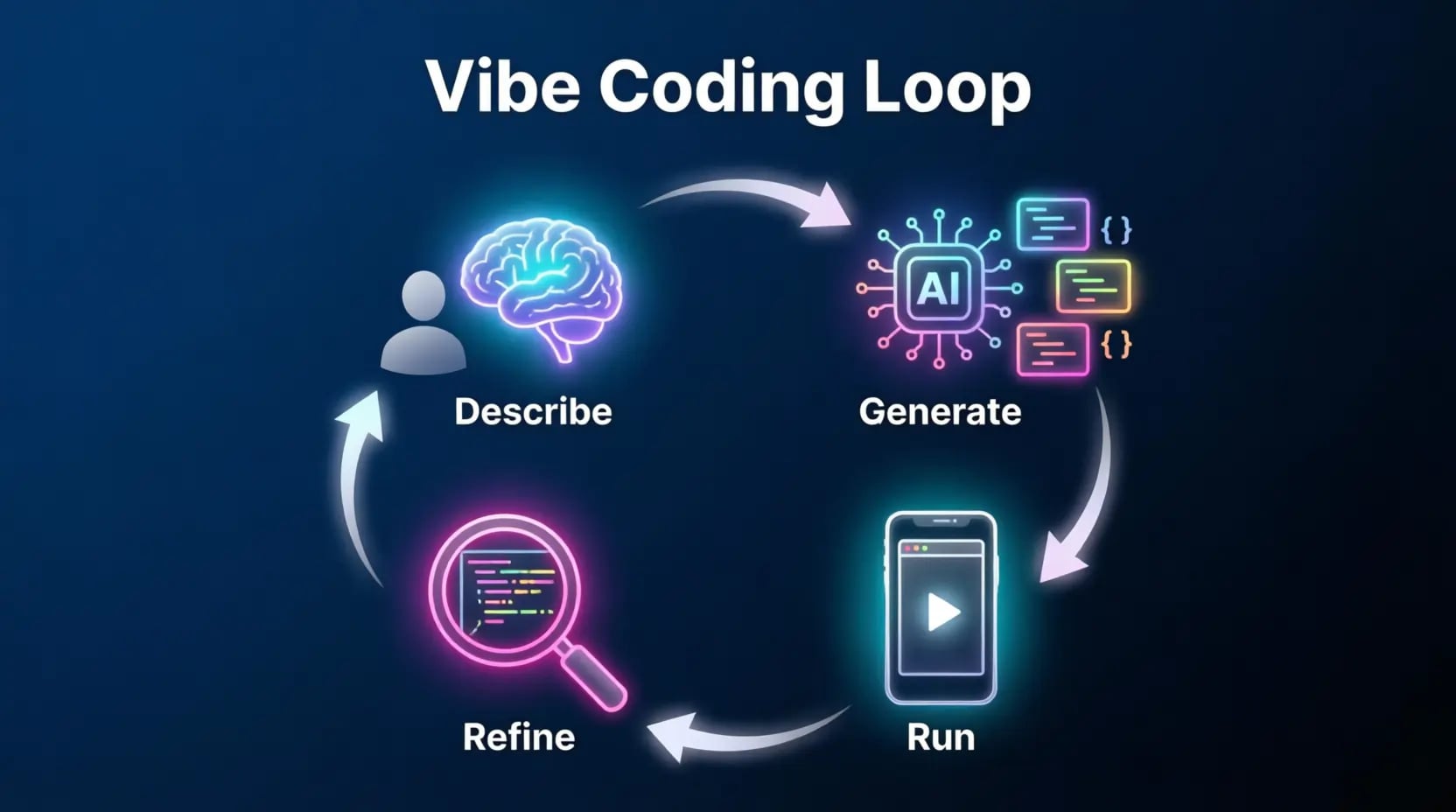
The way developers write software has undergone a radical transformation in recent years. The landscape is no longer limited to isolated developers staring at blank screens; a new movement called "Vibe Coding" has emerged that redefines the relationship between developers and code. This movement, which has gained tremendous momentum, relies on harnessing the power of generative artificial intelligence to transform ideas and textual descriptions into functional code at unprecedented speed. Whether you're a professional developer seeking to boost your productivity or a beginner aspiring to build applications without diving into the complexities of programming, AI code generators are your magical tools to achieve that.
In this comprehensive guide, we'll explore the best AI code generators with a detailed analysis of each tool's features, how to maximize their potential, and exclusive tips for choosing the perfect tool for your next project.
What is Vibe Coding and Why is it Dominating Software Development?

The Essence of Vibe Coding
Vibe Coding is more than just a software tool; it's a new development philosophy. This term was coined by AI pioneer Andrej Karpathy in early 2025, and since then, it has transformed from a novel concept into a mainstream development methodology that empowers creators from all technical backgrounds. This philosophy is built on the idea that artificial intelligence can transform your textual description (in natural language) into ready-to-run code. Instead of spending hours at the keyboard writing complex functions and classes, the developer describes what they want to the generator, and the latter translates the request into functional code.
What sets Vibe Coding apart from traditional development is its focus on intention and purpose rather than implementation details. Instead of thinking about how to write a specific function, the developer thinks about what this function should achieve, leaving the details to the AI. This shift in perspective opens the door for a broader range of people to participate in the software development process. To enhance your skills in working with AI tools, check out the Prompt Engineering Guide which explains how to craft effective commands.
Why Has Vibe Coding Become Essential for Developers?
The secret behind the spread of this phenomenon lies in its ability to break down traditional barriers to software development, offering numerous benefits to developers at all levels:
- Unprecedented Productivity Boost: These tools allow you to focus on "what" you want to build rather than "how" you'll write it, significantly reducing time spent on boilerplate and repetitive code. Developers can accomplish in hours what used to take days.
- Accelerated Learning Curve: Beginner developers can learn new programming patterns by observing the code generated by AI and understanding why it's written that way.
- Overcoming the Blank Page Syndrome: These tools provide an immediate starting point for projects, inspiring developers and eliminating the frustration of starting from scratch.
- Improved Code Quality: AI can suggest best practices, detect security vulnerabilities, and optimize code performance.
- Expanded Developer Base: They enable non-technical people, such as designers and product owners, to turn their ideas into functional prototypes without needing to learn traditional programming.
According to a report by Figma, more than two-thirds of developers (68%) use text prompts to generate code, indicating that this working style has become the new norm. For more on crafting effective prompts, visit the Prompt Library which includes various templates for different use cases.
How AI Code Generators Work
Modern code generators rely on Large Language Models (LLMs) trained on massive amounts of public code. These models, like those used in AI programming tools, learn programming patterns, project structures, and even best practices across various languages and frameworks.
Core Technologies Used
- Large Language Models (LLMs): These are the heart of these tools, understanding natural language and translating it into precise code. The capabilities of these models vary between tools; some rely on open-source models, while others use proprietary, advanced models.
- Code Awareness and Context Understanding: Some advanced tools index the entire codebase, enabling the AI to understand relationships between different files and provide accurate suggestions.
- Autonomous Agents: This technology represents a quantum leap in AI programming, where an intelligent agent independently executes tasks, from searching for solutions to installing dependencies, testing applications, and deploying final products. Learn more about Advanced AI Agents and their role in automating programming tasks.
- Real-Time Execution: Tools like Replit AI and Bolt.new provide live execution environments, allowing developers to see code results immediately and accelerate the development cycle.
Real-World Vibe Coding Projects: Stories from the Field
Let's move from theory to practice. Here are real examples of projects built using Vibe Coding tools, with what worked and what broke, to give you a realistic picture of these tools' capabilities and limitations:
Example 1: Personal Finance Dashboard
A product manager used Cursor to build a personal finance dashboard from banking CSV files. They created a clean interface and interactive charts in a single weekend. What worked: Clean UI and solid charting components. What broke: Data processing was brittle; varying CSV headers caused import failures without any error messages. The project ran for six months before this bug was fixed.
Example 2: Internal CRM System
A small agency used Bolt.new to build a lightweight customer tracking system with contacts, notes, and follow-ups. Bolt.new created a full-stack application in hours. The team used it for three weeks then migrated to Notion. The outcome: The app worked, but the data structure was weird and hard to extend. It was good enough for internal use, but not as a foundation for a future project.
Example 3: CLI Tool for File Renaming
A writer needed a script to batch-rename podcast files according to a date pattern. They described the logic to Claude Code and got a working Python script in ten minutes. The outcome: They used it for a full year without any modifications and never encountered issues. This is a prime example of where Vibe Coding excels: limited scope, zero safety surface, and clear success criteria.
Example 4: Slack Bot for Daily Standups
A remote team built a Slack bot for async daily standups with a morning summary. They used Node.js, the Slack framework, and deployed on Railway. The project went from idea to bot in under four hours. The outcome: It reached production and stayed there. The codebase was messy, but the scope was simple enough to make that irrelevant.
Example 5: E-commerce Prototype with Stripe
A founder used Bolt.new to validate a physical product idea before building a real store. Bolt.new created a product page with Stripe Checkout. The prototype held up for two weeks of low traffic. Then Stripe updated its webhook format, and the code didn't handle the change, causing failed payments to go unrecorded for three days. The prototype served its purpose, but the lesson about webhook reliability stuck.
Example 6: API Wrapper for Internal Data
A data analyst built a thin REST wrapper over PostgreSQL for their non-technical colleagues. They used FastAPI, basic authentication, and deployed on Fly.io. The outcome: The API worked, but authentication was HTTP Basic over HTTPS (technically fine, but minimal practice). There was no rate limiting or query validation. An invalid request could trigger a full table scan. It never happened, but the system was always one bad input away from collapse.
Common Failure Patterns in Vibe Coding Projects
Real-world examples reveal consistent patterns of problems that emerge in Vibe Coding projects, especially when trying to move them to production:
- Lack of Tests: The universal gap. Generated code rarely includes meaningful test coverage, and even when explicitly requested, tests tend to be superficial.
- Duplicated Logic: Language models solve problems locally and don't refactor across the codebase like developers who think about architecture. The same function appears three times in slightly different forms.
- Brittle Authentication: A common problem. Vibe Coding produces authentication that works in the happy path but breaks in edge cases or under adversarial input.
- Missing Error Handling: Generated code assumes valid input. Real users provide invalid input constantly, leading to silent failures and unhelpful error messages.
- Hardcoded Secrets: API keys in source code, credentials in config files, tokens in client storage. This occurs in a significant percentage of Vibe Coding projects not built with security in mind.
Key Criteria for Choosing an AI Code Generator
With so many options available, choosing the right tool becomes a challenge in itself. Here are the most important criteria to help you make the right decision:
Output Accuracy and Code Quality
The quality of generated code is the most important criterion. Test the tool with real projects to evaluate code accuracy, adherence to best practices, and maintainability. Advanced tools produce clean, organized code, while others may produce messy code that needs rewriting.
Supported Languages and Frameworks
Ensure the tool supports the languages and frameworks you use in your projects. Some tools are specialized in specific languages like Python or JavaScript, while others support a wide range of languages. Advanced tools support over 25 languages.
Security and Privacy Level
When working on sensitive projects, check the tool's privacy policy. Some tools offer local execution options to keep code confidential, while others store data on their servers. Tools like SuperNinja run each agent in its dedicated virtual machine for maximum security. For more on privacy policies, see the Privacy Policy.
Best AI Code Generators
1. SuperNinja – The Comprehensive Autonomous Agent
SuperNinja represents a quantum leap in the world of AI programming. Unlike traditional Vibe Coding tools that focus only on code creation, SuperNinja works as a fully autonomous AI agent with a dedicated virtual machine. This means it can not only write code but also search for solutions, install dependencies, test applications, and deploy final products — all from a single natural language prompt. You can experience these capabilities through the AI Agents Generator.
Key Features:
- Self-Directed Task Execution: Describe your project once, and SuperNinja handles everything from research to deployment.
- Multiple Models: Provides access to over 10 leading AI models like GPT, Claude, and Gemini on a single platform.
- Three Agent Modes: Quick mode for rapid prototyping, Standard for daily building, and Complex for sophisticated workflows.
- Secure Environment: Each agent runs in its dedicated virtual machine, providing enterprise-ready privacy and security.
- Unlimited Smart Context: The agent reads and writes files directly to the virtual machine disk rather than cramming the codebase into a model prompt window.
Target Audience:
This tool is ideal for entrepreneurs, developers, and teams who need to go from idea to deployed application with minimal friction. Whether you're building an MVP for a startup, automating business workflows, or creating complex web applications.
2. Manus – The Comprehensive Agent for Professional Teams
Manus goes beyond the role of a traditional coding assistant, working as a multi-purpose autonomous AI agent designed to manage comprehensive and complex software development projects from start to finish. Manus can take a project from a simple idea to a fully deployed application, seamlessly integrating research, design, and development.
Key Features:
- End-to-End Development: Manus can build and deploy complete web and mobile applications from a natural language description.
- Autonomous Operation: Can work independently for hours, conducting research, writing code, fixing bugs, and reporting results.
- Integrated Tool Suite: Includes a browser operator for web automation, a design tool for image generation, and a slide generator for creating project presentations.
- Comprehensive Context Understanding: Through Manus Projects, you can create a persistent workspace containing all your project files, enabling consistent code generation aligned with your existing structure and coding conventions.
Target Audience:
Best suited for developers and teams who need to automate the entire development cycle. Manus excels at taking projects from initial concept to final deployment, building new applications from scratch, and handling complex tasks that require both research and coding.
3. Cursor – Power and Flexibility in VS Code Environment
Cursor is built on VS Code, giving it all the features of this popular environment — extensions, themes, and shortcuts — while adding an advanced AI layer that understands the entire codebase. Cursor has established itself as the original AI-native code editor, reimagined from the ground up for the AI era.
Key Features:
- Comprehensive Codebase Understanding: Can index the entire project and provide accurate suggestions based on deep understanding of the program structure.
- Multi-File Editing: The "Composer" feature allows making changes across multiple files at once from a single instruction.
- Full VS Code Compatibility: Retains all VS Code extensions and shortcuts, eliminating the learning curve.
- Background Agents: Autonomous agents that work on tasks while you focus elsewhere.
Target Audience:
This tool is ideal for professional developers who rely on VS Code in their daily work and teams looking for a reliable, powerful development tool. Cursor excels for experienced developers who want to enhance their existing workflow, especially those working on large codebases.
4. Replit AI – Full-Featured IDE in the Browser
Replit AI combines a full-featured IDE with a powerful AI assistant, all within your browser without any installation or setup required. This combination makes the platform ideal for rapid prototyping and collaborative projects, where users can go from idea to deployed application without leaving the browser.
Key Features:
- Instant IDE: Allows you to start coding immediately upon opening the browser, with support for over 50 programming languages.
- Replit Agent: An AI assistant that can build applications, debug code, and provide intelligent suggestions.
- Instant Deployment: You can deploy your application directly to the internet and share it with others with a single click.
- Team Collaboration: Enables teams to work on the same project simultaneously, with live editing and built-in chat features.
Target Audience:
This platform is ideal for those seeking a comprehensive solution without infrastructure management, for educators and students, and for developers who want a streamlined, fast development experience.
5. Windsurf – AI-Native IDE
Windsurf from Codeium is an IDE built from the ground up to be AI-native. It's designed to provide a seamless development experience where AI is an integral part of the environment, creating a state of creative "flow" without interruption.
Key Features:
- Project-Level Understanding: Its intelligent "Cascade" system excels at understanding relationships between different project files.
- Deep Git Integration: Understands commit history and uses it as context for current work.
- Supercomplete: Uses advanced logic for better autocomplete decisions.
- Modern Work Environment: Designed for peak performance and a smooth user experience with a clean, organized interface.
Target Audience:
This environment is ideal for professional developers seeking an advanced, comprehensive development experience, and teams looking for a unified, efficient workspace. Especially suitable for large projects with enterprise-level code management.
6. Bolt.new – Building Full-Stack Applications at Lightning Speed
Bolt.new represents a revolution in application building speed, allowing you to go from a text idea to a working full-stack application in the browser within minutes. It relies on WebContainers technology to run Node.js inside the browser, providing an instant development and execution environment without any external server.
Key Features:
- Lightning Speed: Generates complete full-stack applications (frontend, backend, and database) in minutes.
- Instant Execution Environment: Runs the application immediately after generation, allowing you to see results and make modifications directly.
- Support for Modern Frameworks: Supports Next.js, Astro, Remix, and other popular frameworks.
- Iterative Chat Interface: You can modify the application through simple text commands like "add a login page."
Target Audience:
This tool is ideal for developers who need rapid prototypes, entrepreneurs testing their ideas, and anyone who wants to build web applications quickly without worrying about environment setup.
7. GitHub Copilot – The Smart Developer Companion
GitHub Copilot, powered by Microsoft and OpenAI, is the most widely adopted tool in the AI programming space. It integrates deeply with GitHub and most popular IDEs, making it an excellent choice for teams already using this platform. It works primarily as an intelligent autocomplete tool, with a chat feature that can help when you're stuck or suggest code improvements.
Key Features:
- Wide Availability: Available in all major IDEs (VS Code, Visual Studio, JetBrains, Vim).
- GitHub Integration: Can generate code from pull requests and issues directly in the GitHub interface.
- Copilot Workspace: For brainstorming and creating specifications using text prompts.
- Copilot Chat: Provides information and recommendations.
Target Audience:
This tool is suitable for teams working on GitHub, developers looking for an affordable intelligent assistant, and enterprises seeking a reliable, certified tool.
8. Lovable – Building Applications Through Conversation
Lovable is a unique tool that lets you build software applications entirely through conversation with AI. This platform is specifically designed for non-technical people, like designers and product managers, who have great ideas but lack the coding expertise to execute them.
Key Features:
- Full Conversation Interface: No need to write a single line of code — just talk to the AI about your application.
- Full-Stack Generation: Generates frontend, backend, and database structure from a single prompt.
- Instant Deployment: Share your application with others with a single click.
- Modern Designs: Focuses on creating stunning, beautiful user interfaces by default.
Target Audience:
This platform is ideal for entrepreneurs and product owners, designers who want to test their ideas, and non-programmers who have software application ideas.
9. Claude Code – A Software Engineer in the Terminal
Claude Code from Anthropic is an agentic coding tool that runs from the command line. Unlike other tools that rely on graphical interfaces, Claude Code is designed for developers who live in the terminal and want full control over their environment. It excels at using complex logic and advanced reasoning to generate unique code, making it an excellent choice for intensive tasks like large-scale refactoring.
Key Features:
- Full Terminal Environment: Runs in the command line, allowing professional developers to work the way they're used to.
- Advanced Reasoning: Uses Anthropic's models for complex reasoning and logic.
- Deep Context Understanding: Can read the entire codebase and understand file relationships.
- Local System Integration: Integrates with the terminal, local file systems, and Git workflows.
Target Audience:
This tool is ideal for professional developers who rely on the command line, projects requiring fine-grained control over the development environment, and tasks that require complex reasoning like large-scale refactoring.
10. v0 from Vercel – The UI Design Expert
v0 from Vercel is a specialized tool for generating React components and user interfaces from text descriptions. This generator focuses on the visual aspect of applications, making it the ideal choice for developers who want to build professional UIs quickly. It intelligently uses different language models based on your input.
Key Features:
- UI Specialization: Generates ready-to-use React components with modern CSS styles.
- Instant Preview: Displays generation results immediately, allowing you to see changes in real-time.
- Design Variety: Offers multiple options for the same interface, allowing you to choose the best fit.
- Vercel Integration: Projects can be deployed directly to the Vercel platform with a single click.
- Figma Import: Can import Figma files to create high-fidelity prototypes.
Target Audience:
This tool is ideal for React developers and frontend engineers, designers who want to quickly convert their designs to code, and teams wanting full-stack prototypes hosted on Vercel.
Tips for Writing Effective Prompts for Code Generators
To get the best results from code generators, you need to master the art of writing effective prompts. Here are some valuable tips to help you:
Be Specific and Clear: Describe what you want to build in as much detail as possible. Instead of "create a login page," say "create a login page with an email field, password field, login button, signup button, and modern design using Tailwind CSS." You can use the AI Article Prompt Generator to craft precise prompts for your projects.
Specify Technologies: Clearly state the programming language, framework, and libraries you want to use. This helps the generator produce code compatible with your project.
Provide Sufficient Context: If you're working on an existing project, include relevant code or briefly describe the project structure so the AI can understand the context.
Use Examples: Provide examples of the code you want or describe the coding style you prefer, helping the generator deliver more accurate results.
Iterate: Don't expect perfect results on the first try. Use feedback to gradually improve outputs. You can leverage the AI Infographic Prompt Generator to create integrated visual prompts.
Break Down Tasks: Instead of requesting a complete project at once, break it into smaller tasks that the generator can handle more efficiently.
Request Tests: One of the most common gaps in generated code is the absence of tests. Explicitly ask for them in your prompt.
Optimizing Your Prompts with Specialized Tools
To maximize the value from code generators, you can leverage specialized tools to improve prompt quality:
AI Agents Generator
This tool enables you to create customized AI agents for specific programming tasks. You can define the agent's role, the tasks it will perform, and the context it will work within, producing a ready-to-use agent for your project.
AI Article Prompt Generator
Whether you're writing documentation for your software project or planning a technical article, this tool helps you craft precise prompts that generate high-quality content. You can specify the topic, target audience, and key points you want to cover.
AI Infographic Prompt Generator
If you need diagrams or explanatory visuals for your project, this tool enables you to create precise visual prompts. Specify the chart type, data to display, and the desired visual style.
AI Product Description Generator
When building a commercial application, you need compelling product descriptions. This tool generates professional descriptions based on product specifications, key features, and target audience.
How to Move a Vibe Coding Project to Production
Based on lessons learned from real-world projects, here are practical steps to move a Vibe Coding project from prototype to production-ready application:
- Code Audit: Read through the codebase first. Understand what it actually does, not what it appears to do.
- Add Test Coverage: Start with paths that could cause data loss or security failures if broken, then work outward from there.
- Refactor Structure: Consolidate duplicated logic and separate concerns. The goal isn't perfect architecture, but a codebase where a second person can understand what's happening without a guided tour.
- Security Review: Authentication, secret management, input validation, and rate limiting. Use the OWASP Top 10 as a checklist.
- Set Up CI/CD: Automatically build and run basic tests on every commit. Prevents regressions before they reach users.
Integrating Code Generators into Daily Workflows
The benefit of code generators isn't limited to writing code from scratch; they can be integrated into various stages of the development lifecycle. You can also leverage the AI Prompt Optimizer to improve prompt quality, and the AI Prompt Translator to translate prompts between different languages.
In the Planning Phase: Use them to quickly explore different ideas and structures, and generate prototypes to test project feasibility. You can leverage Advanced AI Services to improve your plans.
In the Development Phase: They can write complex functions, create APIs, and implement business logic, saving valuable developer time.
In the Testing Phase: Generate unit tests and integration tests, and detect edge cases that developers might overlook.
In the Maintenance Phase: Help with code refactoring, updating libraries, fixing security vulnerabilities, and documenting code.
In the Review Phase: Detect bugs, suggest performance improvements, and ensure adherence to quality standards.
Challenges and Solutions in Using Code Generators
Despite the significant benefits, these tools face some challenges you should be aware of:
Common Challenges and How to Overcome Them
- Generated Code Quality: The generator might produce suboptimal code or follow outdated patterns. Solution: Use advanced tools, request code improvement through iterative prompts, and always review outputs.
- Context Understanding: AI may struggle to understand large, complex projects. Solution: Use tools with high codebase indexing capability like Cursor or Windsurf, and provide adequate context in your prompts.
- Security and Privacy: Sharing sensitive code with external platforms can be risky. Solution: Use tools that offer local execution or isolated environments like SuperNinja and Manus, and check the tool's privacy policies. For more, see the Privacy Policy.
- Over-Reliance: Complete reliance on AI may lead to deteriorating coding skills. Solution: Use generators as assistants, not replacements for learning, and study the generated code to understand and improve it.
Additional Resources to Enhance Your Vibe Coding Journey
To deepen your knowledge and expand your skills in AI programming, here are some valuable resources:
- Prompt Library: A wide collection of ready-to-use prompts for various programming domains.
- Prompt Engineering Guide: A comprehensive guide to crafting effective prompts and improving AI output quality.
- Blog: Updated articles on the latest developments in AI and programming.
- AI Services: A collection of specialized tools and services for content generation, designs, and prompts.
- AI Ad Generator: For generating professional ad copy.
- AI Logo Prompt Generator: For creating prompts that generate innovative logos.
The Future of Vibe Coding: Where Are Things Headed?
The future of Vibe Coding points toward deeper integration between AI and developers, with exciting developments on the horizon:
- Increased Autonomy: Tools will execute larger tasks without human intervention and make intelligent architectural decisions, as already seen with tools like SuperNinja and Manus.
- Improved Contextual Understanding: Models will be able to comprehend larger, more complex projects and understand relationships between system components.
- Multimodal Generation: Tools will move from generating code to generating documentation, tests, and even complete infrastructure.
- Deeper IDE Integration: AI will become an integral part of every development environment, with seamless, natural workflows.
- Greater Personalization: Tools will learn from your specific coding patterns and adapt to your development style.
The bottom line: AI code generators aren't just futuristic tools; they're a reality reshaping the software industry today. Whether you're a professional developer or a beginner, embracing these technologies will enable you to build better software faster, giving you a competitive edge in the accelerating job market.
To contact our team or inquire about any of these tools, visit the Contact Page or browse the Generators List available.
You might also like
Master 12 proven ChatGPT prompt secrets: role prompting, chain-of-thought, custom instructions & GPTs. Updated for 2026.
The ultimate guide to optimizing your website and prompts for ChatGPT in 2026. Generative Engine Optimization (GEO), technical preparation, featured snippets, 15 practical ways to improve AI responses, and ready-to-use prompt templates.
55+ free ready-to-use AI prompts for digital advertising — Facebook, Google, TikTok, Instagram, and LinkedIn with real results
Comprehensive ChatGPT vs Claude vs Gemini comparison. Discover which AI model is best for coding, writing, research, and business. Complete AI tools comparison guide with pricing, features, and use cases for 2026.