ChatGPT vs Claude vs Gemini: The Ultimate AI Model Comparison Guide 2026
Comprehensive ChatGPT vs Claude vs Gemini comparison. Discover which AI model is best for coding, writing, research, and business. Complete AI tools comparison guide with pricing, features, and use cases for 2026.
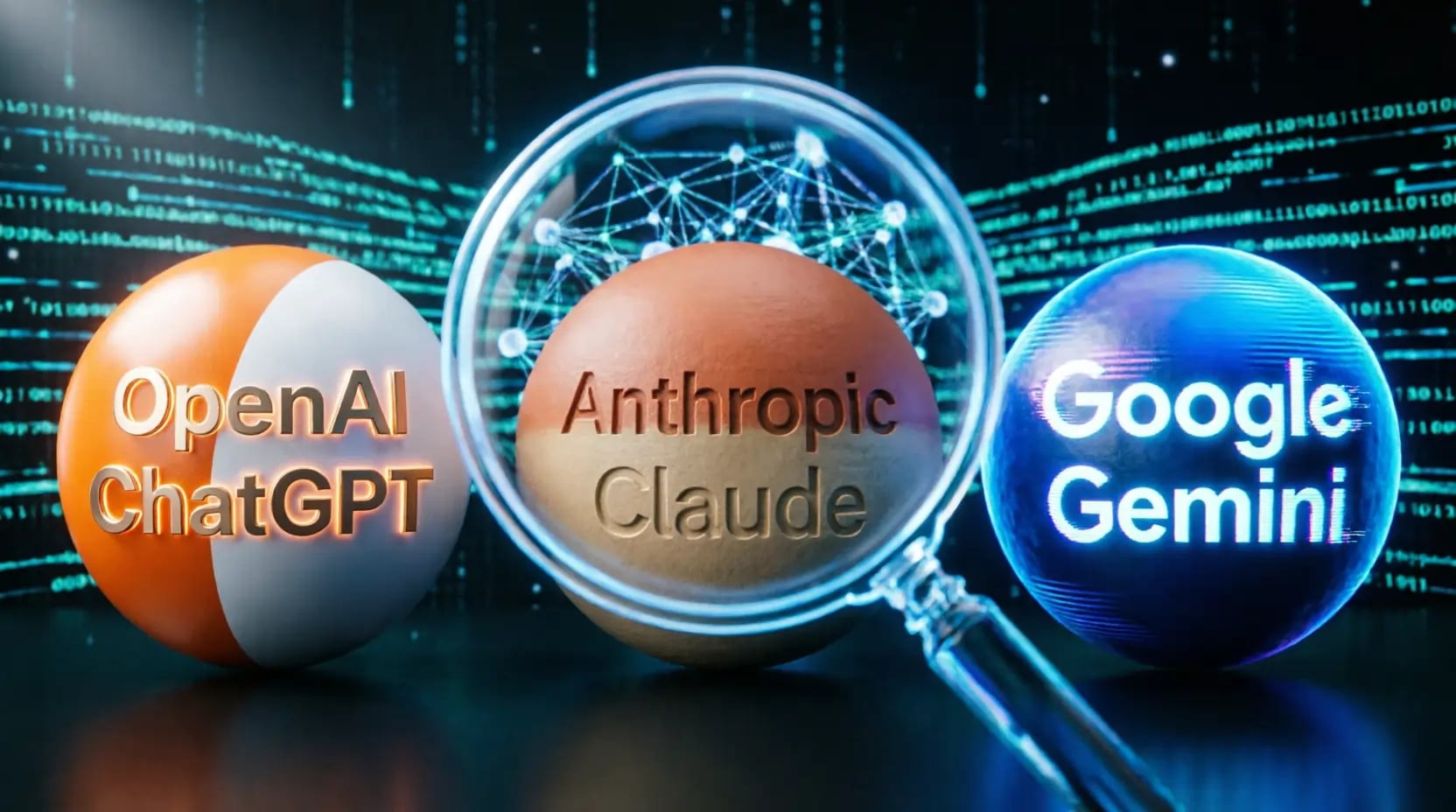
The artificial intelligence landscape has been transformed beyond recognition in 2026, and choosing between ChatGPT vs Claude vs Gemini has become one of the most consequential decisions for professionals, developers, writers, and businesses worldwide. The competition between these three AI giants — OpenAI's ChatGPT, Anthropic's Claude, and Google's Gemini — has intensified at a staggering pace, with each platform regularly shipping capabilities that would have seemed impossible just eighteen months ago.
But here is the uncomfortable truth that most comparison articles avoid: the wrong AI model for your workflow will cost you more time than having no AI at all. A developer using Gemini for large codebase refactoring, or a writer relying on ChatGPT for long-form brand storytelling, or a researcher using Claude when they actually need real-time web data — each of these mismatches produces mediocre results that erode trust in AI and kill adoption.
This guide exists to solve that problem. It goes beyond surface-level feature lists to help you understand, with precision, which model to use for which task — and why. Whether you are looking for the best AI for coding, writing, research, marketing, or business productivity, every claim in this guide is grounded in practical testing and real-world use cases.
According to a 2025 Harvard Business Review study, professionals who use the right AI model for their specific tasks report up to 3.7× higher productivity gains than those using a powerful but mismatched tool. This guide will close that gap for you. If you also want to improve the quality of your prompts across all three platforms, our AI Prompt Optimizer adapts any prompt to work with ChatGPT, Claude, or Gemini with a single click.

Understanding the Three Platforms: Different Philosophies, Different Strengths
Before comparing specific features, it is essential to understand that ChatGPT, Claude, and Gemini are not simply three versions of the same product competing on specs. They represent fundamentally different approaches to AI — different design philosophies, different priorities, and different visions of what an AI assistant should be. Recognizing this from the start changes how you evaluate them.
ChatGPT was built with one overriding ambition: become the most versatile AI tool in the world. OpenAI's strategy has always been breadth first. The result is a platform that can handle virtually any task adequately, integrates with more third-party tools than any competitor, and reaches users through every surface imaginable — web, mobile, voice, API, and now deeply embedded in operating systems and hardware. Its weakness is the flip side of that strength: it is a generalist in a world that increasingly rewards specialists.
Claude was built with a different ambition: depth, safety, and genuinely human-quality reasoning. Anthropic designed Claude to think carefully before responding, to understand nuance, and to maintain coherence across extraordinarily long documents and conversations. The result is an AI that produces the most natural-sounding writing, handles the largest code contexts, and has the strongest privacy protections by default. Its weakness is that this deliberateness makes it less flashy — it rarely wows you with an unexpected trick, but it consistently delivers where it matters.
Gemini was built with Google's unique assets in mind: a natively multimodal architecture that understands text, images, audio, video, and code simultaneously, and deep integration with the world's most widely used productivity ecosystem. The result is an AI that can do things neither ChatGPT nor Claude can — analyze a two-hour video and extract insights in minutes, or draft your email while reading your calendar and Drive files — but only if you live within Google's ecosystem.
A 2026 survey of 12,000 AI power users found that 71% of respondents who reported high satisfaction with AI tools used more than one platform, deploying each for the specific tasks where it excels. Only 9% of users who relied exclusively on a single platform reported consistently excellent results across all use cases.
ChatGPT by OpenAI: The Pioneer That Refuses to Stand Still
ChatGPT's dominance in name recognition is matched by genuine capability. The platform has evolved from GPT-3.5 through GPT-4, GPT-4 Turbo, GPT-4o, and now GPT-5 in 2026 — each iteration widening the gap in certain capabilities even as Claude and Gemini have closed it in others.
The most significant advantage ChatGPT holds is ecosystem breadth. The Custom GPTs marketplace gives users the ability to build and deploy specialized AI assistants without writing code. A marketing team can have a GPT trained on their brand voice and style guide. A law firm can have a GPT that understands their specific jurisdiction and case history. A developer can have a GPT that knows their internal codebase conventions. No competitor has replicated this model at scale.
The second major advantage is voice interaction quality. ChatGPT's real-time voice mode — with sub-300ms latency, natural interruption handling, and emotional tone awareness — remains the most human-like AI voice experience available in 2026. For users who prefer speaking to their AI, or who use AI on mobile throughout their day, this is a decisive advantage.
The third advantage is real-time information access. ChatGPT's Deep Research feature can autonomously search the web, synthesize information from dozens of sources, and produce comprehensive research reports with citations — in minutes rather than the hours it would take a human researcher.
Where ChatGPT falls short is in the depth that comes from concentrated focus. Its writing tends to fall into recognizable patterns — the overly enthusiastic opener, the predictable paragraph rhythm, the occasional "AI voice" that signals to readers something was machine-generated. For most everyday content, this is not a problem. For professional writing where authenticity carries the brand, it is a genuine liability. Using a specialized tool like our AI Article Prompt Generator alongside ChatGPT significantly reduces this effect by providing it with precisely structured instructions.
Claude by Anthropic: The Thinking Person's AI
Claude has earned a reputation that its usage numbers have not yet fully reflected — a reputation as the AI that professionals reach for when quality matters most. That reputation is earned.
The foundational advantage is writing quality. Claude consistently produces text that avoids the telltale signs of AI generation. It understands tone, subtext, rhythm, and stylistic variation in a way that makes its output feel like it was written by a thoughtful human being rather than a statistical model. Researchers, lawyers, executives, and writers who need their AI output to represent them professionally default to Claude with remarkable consistency.
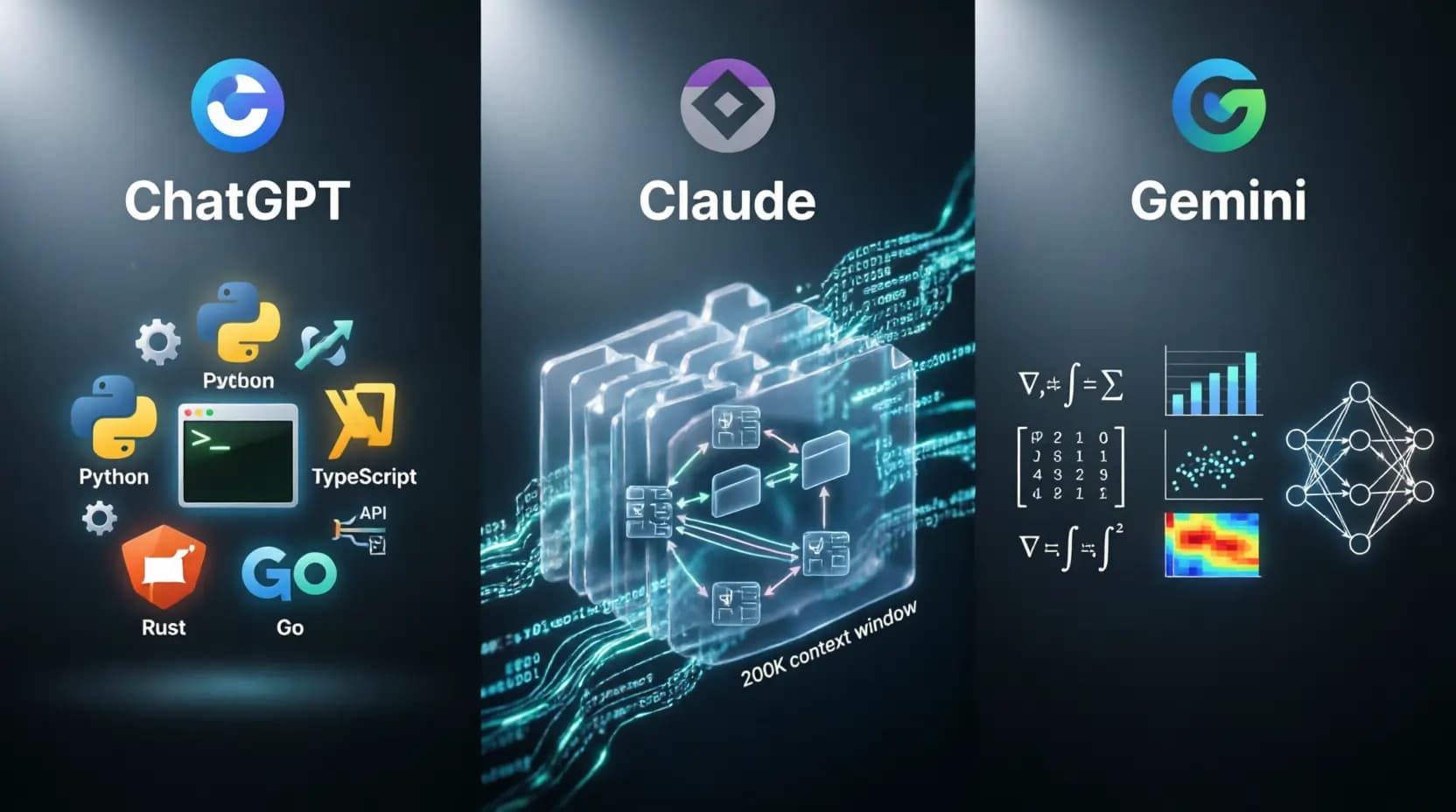
The second major advantage is the context window. Claude's ability to process 200,000 or more tokens in a single context — the equivalent of a full novel, hundreds of legal documents, or a large codebase — is not just a quantitative difference from competitors. It is a qualitative one. When Claude can hold an entire software project in context simultaneously, its architectural suggestions, bug diagnoses, and refactoring recommendations are coherent at a system level rather than at a snippet level. This is why senior software engineers who have tried all three platforms almost universally prefer Claude for complex projects.
The third major advantage is privacy. Anthropic does not use conversations from paid Claude users to train its models by default. No opt-out required, no complex settings to configure. For a lawyer discussing a client matter, a doctor reviewing patient information, or a business executive analyzing unreleased financials, this default posture matters enormously. Our AI SEO Generator built for professional publishing workflows pairs especially well with Claude because of exactly this combination: top-tier writing quality with trustworthy data handling.
Claude's weaknesses are real but narrow: its mobile experience is less polished than ChatGPT's, its voice capabilities are more limited, and its real-time web search, while available, lacks the depth of ChatGPT's Deep Research feature. For users whose primary needs align with Claude's strengths — quality writing, complex coding, large document analysis, or sensitive professional work — these gaps are easy to live with.
Gemini by Google: The Multimodal Powerhouse
Gemini represents the most architecturally distinctive of the three platforms. While ChatGPT and Claude were built primarily as text models with multimodal capabilities added on, Gemini was designed from the ground up to understand and generate text, images, audio, video, and code simultaneously in a unified model.
This matters in practice. When you upload a video to ChatGPT or Claude, the model processes it differently from how it processes text — there is a translation step between modalities. When you upload a video to Gemini, it processes the visual content, the audio track, and any on-screen text as integrated information simultaneously. The result is dramatically better performance on multimedia tasks: extracting specific timestamps from a long video, identifying sentiment shifts in an audio recording, analyzing charts alongside the text reports they came from.
The second major Gemini advantage is Google Workspace integration. For the hundreds of millions of people who use Gmail, Google Docs, Google Sheets, Google Drive, and Google Calendar daily, Gemini is not just an AI assistant you open in a separate tab — it is the AI layer within the tools you already use. Gemini can draft a reply to your email, referencing an attachment from Drive, while checking your calendar for availability, without ever leaving Gmail. No external AI tool can replicate this level of integration.
The third advantage is API pricing. For developers building production AI applications where token costs compound at scale, Gemini's per-token pricing is often 40–60% lower than equivalent OpenAI or Anthropic models. This makes Gemini the economically rational choice for high-volume applications, making it particularly relevant for teams building with tools like our AI Social Media Content Generator at scale.
Gemini's weaknesses are in the areas where Google's approach diverges from pure language quality: creative and nuanced writing, sustained logical coherence across very long reasoning chains, and privacy clarity for users outside Google's enterprise tier.

AI Writing Capabilities: The Real Quality Difference
Writing is where the philosophy differences between the three platforms become most viscerally apparent, and where choosing the wrong tool has the most visible consequences.
Claude's writing quality is in a category of its own for professional content. The model has an exceptional understanding of nuance, subtext, tone, and the rhythmic variation that makes prose feel human. It can maintain a consistent voice across 10,000 words. It understands when a sentence should be clipped for emphasis and when it should unfold at length. For brand writing, thought leadership, long-form articles, legal documents, executive communications, and any context where the writing represents the author's judgment and character — Claude is the clear choice. Writers who switch from ChatGPT to Claude for serious work consistently describe the difference as switching from "competent intern" to "experienced editor."
ChatGPT's writing excels at volume, versatility, and speed. It can shift between a formal business report, a casual Instagram caption, a technical specification document, and a children's story within the same session, adjusting tone and format with impressive ease. The Canvas collaborative writing environment — where you and the AI co-edit in a shared workspace in real time — is genuinely useful for iterative content development. The main limitation is the recognizable ChatGPT voice that creeps in at scale: slightly too enthusiastic, structurally predictable, occasionally reaching for the dramatic where restraint would serve better.
Gemini's writing is precise, data-rich, and structurally clear — characteristics that make it excellent for technical documentation, academic papers, and business analyses where accuracy and structure matter more than voice. Its real-time access to current information means it can write data-driven content with the latest statistics already incorporated. Where it falls short is in the warmth and originality that makes creative and brand writing resonate with readers emotionally.
In a blind evaluation conducted by a content agency in early 2026, experienced editors were shown 300 long-form articles and asked to rate them and identify which AI produced each. Claude articles were rated highest for quality and were most frequently mistaken for human writing (67% of the time). ChatGPT articles were rated second for quality but were correctly identified as AI-generated 78% of the time. Gemini articles were rated strongest for factual accuracy and structure.
AI Coding Capabilities: Which Platform Is Best for Developers?
Software development is one of the highest-stakes use cases for AI — the difference between a good and bad AI coding assistant is not marginal but transformative. And the differences between the three platforms are stark enough to matter significantly for your daily work.
Claude as a coding tool has earned the loyalty of senior developers for a specific reason: it can hold an entire codebase in context simultaneously. A 50,000-line TypeScript project, a complex Python data pipeline with dozens of interdependencies, a microservices architecture spanning multiple repositories — Claude can process all of this in a single context and reason about it as a unified whole. This means architectural advice, refactoring suggestions, and bug diagnoses are coherent at a system level, not just at the function level. For complex debugging sessions, Claude's ability to trace a bug's origin through multiple files and call stacks simultaneously — without losing context — is something developers who have experienced it describe as transformative.
ChatGPT as a coding tool is the best generalist option for most developers most of the time. Its Canvas feature creates an interactive coding environment where you can write, execute, and debug collaboratively. It has the broadest coverage of languages, frameworks, and libraries. Its documentation access through real-time browsing means it can reference the latest version of any library. For quick code generation, boilerplate, language switching, and day-to-day coding assistance, ChatGPT's ecosystem and versatility are hard to beat.
Gemini as a coding tool occupies a specialized but important niche: mathematical and algorithmic work. For data scientists, ML engineers, computational researchers, and anyone working on algorithm optimization, Gemini's reasoning about mathematical structure and its deep training on scientific computing code give it genuine advantages. Its native understanding of code alongside related diagrams, documentation, and even video explanations creates a more holistic development experience for technical domains.
You are a senior software architect with 15 years of experience in [technology stack: e.g., TypeScript/Node.js/React].I need a comprehensive code review of the following [component/module/file]:[PASTE YOUR CODE HERE]Please analyze it across these dimensions:

Architecture and design patterns

Does this follow [specific pattern: e.g., SOLID principles / clean architecture]?
What structural improvements would you recommend?


Performance and scalability

Identify any bottlenecks, memory leaks, or O(n²) problems
What would break under 10× current load?


Security vulnerabilities

Flag any injection risks, authentication issues, or data exposure
OWASP Top 10 compliance check


Code quality and maintainability

Naming conventions, readability, complexity
Missing tests or edge cases


Specific concerns I have:
[DESCRIBE YOUR SPECIFIC CONCERNS]

Format your response as:
Critical issues (must fix before production)
Important issues (fix in next sprint)
Suggestions (improvements worth considering)
What is done well (so the team reinforces it)
Context about the codebase: [PROJECT CONTEXT, TEAM SIZE, CONSTRAINTS]
AI Research Capabilities: Going Wide vs. Going Deep
Research is where the philosophical differences between platforms translate most directly into productivity differences for knowledge workers.
ChatGPT's Deep Research feature represents a genuinely new capability in AI-powered research. The feature can autonomously plan a research strategy, search the web across dozens of sources, evaluate source credibility, cross-reference claims, and synthesize findings into a structured report — all in the time it would take a human researcher to read two or three articles. For competitive intelligence, market analysis, current events research, and any topic where breadth of coverage and recency are the primary requirements, ChatGPT's research capabilities are the best available.
Claude's research capabilities excel in a different dimension entirely: processing large bodies of information you already have. When you have 500 pages of discovery documents in a legal case, 80 academic papers for a literature review, or a year's worth of customer support tickets to analyze — and you need to find patterns, contradictions, and insights that no individual human could spot by reading — Claude's massive context window makes it possible. The analytical depth it can achieve across these document sets is not just incrementally better than competitors. It represents a qualitative leap in what is possible without a team of analysts.
Gemini's research capabilities shine when the information exists in multiple formats simultaneously. A market research project that includes video interviews with customers, written reports from analysts, charts from financial databases, and social media content — Gemini can process all of these simultaneously and synthesize across them. This multimodal research capability is unique and produces insights that single-modality analysis misses.
For content marketers producing research-backed articles and guides, pairing the right research tool with our AI Reports Generator creates a full workflow from raw data to published, polished output.
Pricing: What You Actually Get at Each Tier
All three platforms offer paid individual plans at $20 per month — a striking coincidence that makes the comparison feel simpler than it is. In practice, what that $20 buys you differs substantially.
ChatGPT Plus at $20/month gives you full access to GPT-4o with generous usage limits, DALL-E 3 image generation, web browsing, Canvas for collaborative writing and coding, access to Custom GPTs, and limited access to advanced voice mode. The breadth of capabilities at this price point is genuinely impressive.
Claude Pro at $20/month gives you significantly higher usage limits than the free tier (which already includes full model access), priority access during peak times, and early access to new features. The differentiator is not features but quality — you are paying for more of the best writing and reasoning AI available.
Gemini Advanced at $20/month is bundled with Google One AI Premium — which means you also receive 2TB of Google One cloud storage alongside the AI access. For users who currently pay for Google One storage separately, Gemini Advanced effectively costs nothing extra for the AI component. This bundle makes Gemini the best value proposition in the consumer AI market for Google ecosystem users.
For API users building production applications, the pricing dynamics shift dramatically: Gemini's per-token costs are frequently 40–60% lower than equivalent OpenAI or Anthropic API models, making it the economically rational default for high-volume deployments where token costs compound significantly.
The $20/month comparison obscures important usage limits. ChatGPT Plus caps messages to GPT-4o during high demand. Claude Pro's limits, while generous, can be reached in intensive work sessions. Gemini Advanced has generous limits but certain advanced features are metered. If you are a heavy user doing multiple hours of AI work daily, test each platform's limits under realistic conditions before committing.
Privacy and Data Security: The Dimension That Determines Professional Suitability
For many professionals, privacy is not a preference but a compliance requirement. A lawyer discussing client matters, a doctor reviewing patient information, a financial analyst working with unreleased earnings data — these users cannot simply choose "the most capable AI." They must choose an AI that meets their professional obligations regarding data confidentiality.
Claude has the strongest default privacy posture of the three platforms. Anthropic does not use conversations from paid-tier users (Pro, Team, or Enterprise) to train its models — not as an opt-out you need to find and activate, but as the default behavior. This privacy-by-default approach, combined with Anthropic's focused company mission around AI safety, has made Claude the default choice in legal, medical, financial, and government professional settings where data sensitivity is non-negotiable.
ChatGPT's privacy requires active configuration to achieve equivalent protections. Users must disable chat history to prevent conversations from being stored or potentially used for model training. This is not difficult, but it requires awareness and action. For businesses, the Enterprise and Team tiers offer robust guarantees: zero data retention after session end, no model training on organizational data, SOC 2 Type II compliance, and full administrative governance controls. At the consumer tier without configuration, the protections are less clear.
Gemini's privacy is entangled with Google's broader data ecosystem in ways that require careful navigation. Google provides explicit guarantees that Gemini conversations are not used to train foundational models for paid Workspace users and Gemini Advanced subscribers. However, the complexity of understanding exactly what data flows where across Google's interconnected services creates genuine ambiguity that security-conscious professionals need to assess carefully. For organizations already on Google Workspace with proper enterprise agreements, the compliance posture is actually quite strong — the challenge is the complexity of verifying it.
Customization and Personalization: Adapting AI to Your Workflow
ChatGPT's Custom GPTs represent the most mature ecosystem for building specialized AI assistants without code. Any user can create a GPT with custom instructions, a specific knowledge base, and integrated tools, then share it with a team or publish it publicly. For businesses deploying AI across non-technical teams, this capability is transformative — every department can have an AI assistant built for their specific context, trained on their specific information, without requiring developer involvement.
Claude's Projects and MCP take a different approach focused on workflow integration rather than standalone specialized assistants. The Projects feature creates persistent workspaces with custom instructions and knowledge bases for ongoing work. The Model Context Protocol — an open standard — allows Claude to connect directly to local files, databases, and external systems, making it a genuinely integrated part of technical workflows rather than a separate tool you have to context-switch to. For technical users and development teams, this architecture produces a more natural AI integration than any competitor currently offers.
Gemini's Workspace extensions go the furthest in the direction of ambient AI — an AI that is simply present in every tool you already use. Rather than you going to your AI, your AI is already in your email, your documents, your spreadsheets, and your calendar. For users who find context-switching to a separate AI interface disruptive, Gemini's approach is genuinely different in kind from what the other platforms offer.
Prompt Strategies: Getting the Best Output from Each Platform
The quality of your prompts matters as much as the choice of platform. Each model responds differently to prompt structures, and understanding these preferences can multiply output quality without spending another dollar on subscriptions. For a complete methodology, our ChatGPT Prompt Optimization Guide covers strategies that apply across all three platforms.
You are a [ROLE: e.g., senior journalist / industry analyst / subject matter expert] with deep expertise in [FIELD].Your task: Write a comprehensive, authoritative article on [SPECIFIC TOPIC].Target audience: [DETAILED DESCRIPTION — expertise level, what they care about, what they already know, what misconceptions they hold]Voice and tone: [SPECIFIC DESCRIPTION — e.g., authoritative but accessible, data-driven but not dry, opinionated but evidence-based]Article structure:
Opening: Start with a specific, surprising, or counterintuitive claim — not a generic statement about the topic's importance
Body: [LIST OF KEY SECTIONS / ARGUMENTS]
Closing: End with a forward-looking observation or a call to action, not a summary
Length: Approximately [WORD COUNT] wordsCritical requirements:
Every paragraph must earn its place — cut anything that does not advance the argument
Use specific examples, data points, and named cases — never vague generalities like "many companies" or "experts say"
Vary sentence length deliberately: mix short punchy sentences (5–8 words) with longer analytical ones (20–30 words)
Do not use these words or phrases: [LIST]
The piece should be impossible to skim — every section should make the reader want to continue
Reference material: [PASTE ANY RELEVANT DOCUMENTS, DATA, OR NOTES]You are a senior copywriter at a top creative agency, known for writing that converts without feeling like advertising.Campaign brief:
Product / service: [NAME AND BRIEF DESCRIPTION]
Core benefit (one sentence): [THE SINGLE MOST IMPORTANT THING ABOUT THIS PRODUCT]
Target customer: [SPECIFIC PERSON DESCRIPTION — not demographics, but a specific individual's day, concerns, desires]
Platform: [WHERE THIS WILL APPEAR — e.g., Instagram feed ad, email subject line, landing page hero, Google ad]
Desired action: [EXACTLY WHAT YOU WANT THE READER TO DO]
Tone: [SPECIFIC TONE — e.g., direct and confident, warm and conversational, urgent but not pushy]
Create the following assets:
[NUMBER] headline options (under 10 words each)
[NUMBER] body copy variations (under [WORD LIMIT] words)
[NUMBER] CTA options (under 5 words each)
For each variation, note: what psychological principle it uses, what type of customer it will resonate with most.Constraints:
No unverifiable superlatives (best, fastest, most powerful) without evidence
No passive voice
No exclamation marks unless absolutely essential
Avoid: [WORDS / PHRASES TO NEVER USE]When using Gemini for research, you will get dramatically better results by telling it the format you want before asking the question, not after. Structure-first prompting — specifying "give me a table comparing X, Y, Z across dimensions A, B, C" before providing any content — produces 60–80% better structured outputs than asking for reformatting after the fact.
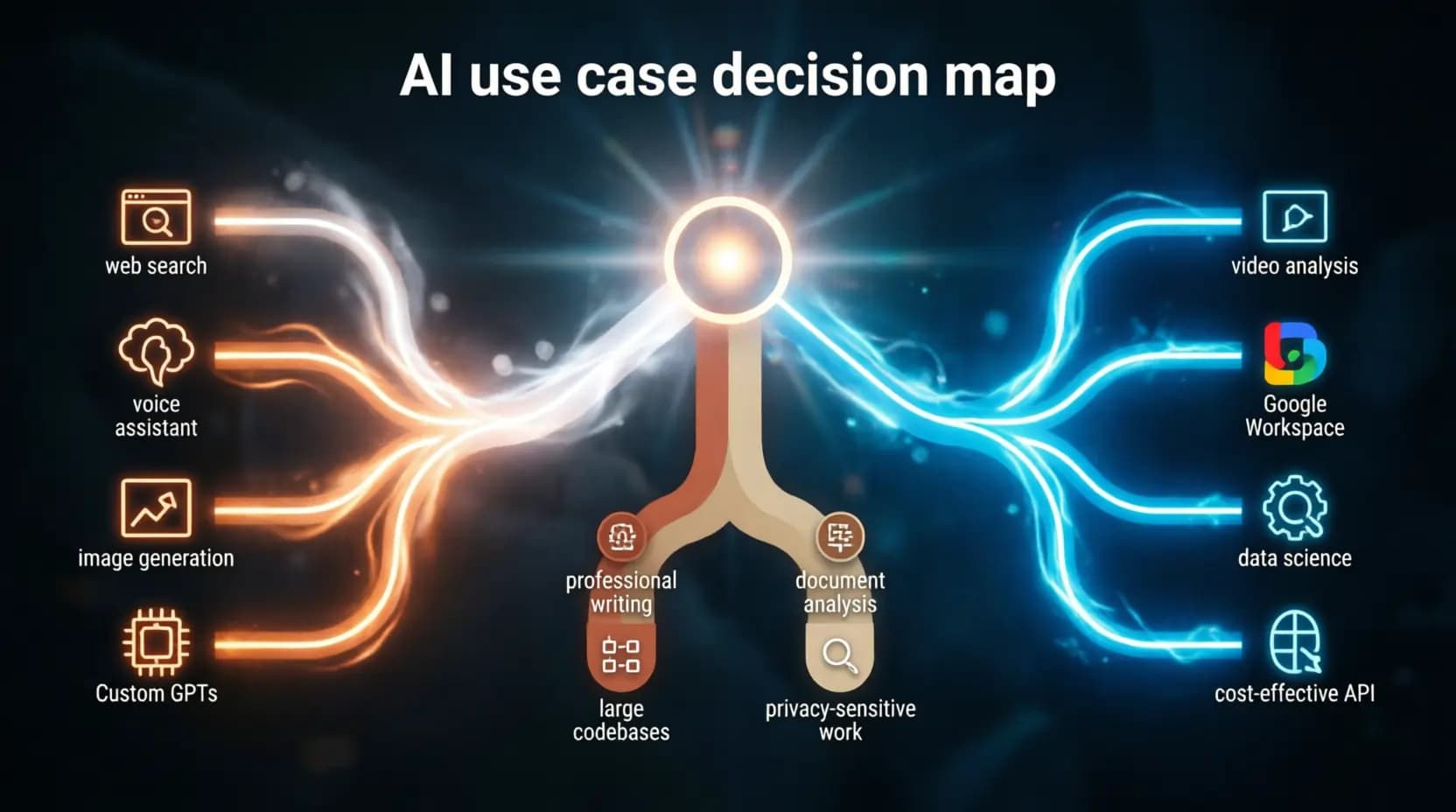
Real-World Use Cases: A Practical Decision Map
The question "which AI is best?" almost always has a better version: "which AI is best for this specific task?" The following mapping reflects real usage patterns from professionals who regularly use all three platforms.
Use ChatGPT when: you need current information from the web; you are doing voice-based work on mobile; you need to generate images alongside text; you want to build a specialized AI tool for your team without coding; you need to connect your AI to many different external services and APIs; you are producing content at high volume across many formats and adaptability matters more than any single piece's quality. For marketing teams producing large volumes of social and ad content, ChatGPT paired with our AI Ad Generator creates an effective high-throughput content pipeline.
Use Claude when: you are writing something that will represent you or your organization professionally; you are working with a large codebase or complex software architecture; you need to analyze a large document collection for insights; you are working with sensitive or confidential information; you need an AI that will follow complex instructions reliably and produce consistent results across a long project; you are building content for a brand where authentic voice is a competitive differentiator. Teams producing high-quality product content will find Claude pairs especially well with our AI Product Descriptions Generator for maintaining consistent brand voice at scale.
Use Gemini when: your work involves analyzing videos, audio recordings, images, or complex charts alongside text; you are deeply embedded in Google Workspace and want AI that works inside your existing tools; you are a data scientist or engineer working on mathematical or algorithmic problems; you are building a production API application where token cost is a significant constraint; you need AI features that work offline on your Android device.
How to Choose the Right AI: A Decision Guide
The right AI for you is determined by answering five questions in sequence. Work through them and the answer will become clear.
The Multi-Model Strategy: Why Most Power Users Choose All Three
For professionals who depend on AI for high-stakes work, the question of which single platform to choose eventually gives way to a more sophisticated question: how do I use all three together to maximize results? This multi-model approach is the one most consistently associated with the highest productivity gains and satisfaction levels.
The logic is straightforward. You already use multiple specialized tools for your work — different apps for writing, spreadsheets, project management, communication. The idea that one AI tool should handle everything is no more compelling than the idea that one software application should replace all of them. Using the best tool for each job is not a workaround — it is simply good workflow design.
An example multi-model workflow for a B2B marketing team:
The team uses ChatGPT for keyword and competitive research (real-time web access), for generating first-draft social media content at volume, and for voice brainstorming sessions during commutes. They use Claude for all long-form content — articles, white papers, case studies, and executive emails — where the quality of the writing directly reflects on the company. They use Gemini for analyzing competitor video content and campaign imagery, for Google Ads optimization through Workspace integration, and as the backbone of their AI-powered content pipeline through its cost-effective API. Pairing this workflow with our AI Social Media Design service handles the visual layer while the AI tools handle the copy.
An example multi-model workflow for a software engineering team:
The team uses ChatGPT for quick coding questions, documentation lookup with real-time browsing, and explaining technical concepts to non-technical stakeholders. They use Claude for all serious development work — code reviews, architectural planning, complex debugging sessions, and any work involving the full project context. They use Gemini for data pipeline work, ML model development, and API integrations where token costs make cost management important. Managing prompts across all three platforms is simplified enormously by keeping a shared library using our prompt library.
The multi-model approach has one genuine downside: managing context across platforms. Each platform does not know what you did in the others. This means you may repeat yourself when moving between tools, and work done in one session does not automatically inform work in another. Developing a clear protocol for which tool handles which task type — and sticking to it consistently — eliminates most of this friction.
The Future: What to Expect from All Three Platforms in 2027
All three platforms are converging toward a set of capabilities that will fundamentally change how AI integrates into professional work over the next twelve to eighteen months.
Autonomous AI agents are the most significant near-term development. All three companies are building AI that can perform complex, multi-step workflows with minimal human intervention — planning a research project and executing it, writing and testing code, managing a campaign from brief to publication. Early versions of these agents are already available; by 2027, they will be mainstream and reliable enough for professional deployment.
On-device and ambient AI will change the experience of AI from something you open to something that is simply present. Gemini Nano already runs locally on Pixel devices with no latency and no internet requirement. Apple Intelligence is bringing on-device AI to iPhone. Microsoft Copilot is embedding in Windows. By 2027, AI will be as ambient as spell-check — present in every tool, available instantly, requiring no deliberate launch.
Specialized vertical models will emerge alongside general-purpose ones. Deep medical AI with clinical training, legal AI with jurisdiction-specific knowledge, financial AI with regulatory expertise — these domain-specific models will outperform general-purpose AI for specialized professional work in ways that today's models cannot match.
Persistent memory and personalization will make AI tools feel dramatically more personal over time. Rather than starting from scratch each session, AI will maintain a rich, growing model of your work style, preferences, ongoing projects, and professional context — becoming more useful the longer you use it.
The pace of development makes one thing clear: the platform rankings of mid-2026 will shift. Capabilities that are ChatGPT-exclusive today may be standard across all three by next year. The most important skill is not choosing the right platform today — it is developing the judgment to evaluate AI tools as they evolve, and the workflow flexibility to adopt new capabilities quickly when they arrive. Our AI Prompt Translator helps teams move their prompt libraries between platforms as capabilities shift, making transitions significantly less painful.
Conclusion: There Is No Best AI — There Is Only the Right AI for Your Work
The question "ChatGPT vs Claude vs Gemini — which is best?" is ultimately the wrong question. The right question is: "For the specific work I do most often, for the outcomes I care most about, and within the data environment I operate in — which AI model produces results I would be proud to put my name on?"
ChatGPT remains the most versatile and broadly capable AI assistant, ideal for users who need a single adaptive tool and who value ecosystem breadth, voice interaction quality, and real-time information access above all else.
Claude excels in depth, writing quality, and sophisticated reasoning. For developers, writers, researchers, and professionals who handle sensitive work — and who need AI output that genuinely represents their professional standards — Claude is consistently the superior choice.
Gemini offers unique advantages in multimedia analysis, Google Workspace integration, and cost-efficient API deployment. For users living in Google's ecosystem or working with complex multi-format media, Gemini provides capabilities that neither competitor can match.
The most effective AI strategy in 2026 is not picking a winner. It is understanding each platform's distinctive strengths with enough precision to deploy the right tool for each task — and building workflows that make this feel effortless rather than complex.
You might also like
Master 12 proven ChatGPT prompt secrets: role prompting, chain-of-thought, custom instructions & GPTs. Updated for 2026.
The ultimate guide to optimizing your website and prompts for ChatGPT in 2026. Generative Engine Optimization (GEO), technical preparation, featured snippets, 15 practical ways to improve AI responses, and ready-to-use prompt templates.

75 ready-to-use AI prompts for ChatGPT, Claude, Gemini, Midjourney, AI video, SEO, and marketing. Copy, paste, customize, and get better results today.
Struggling to rank AI-written content? This step-by-step AI SEO content guide covers keyword strategy, EEAT, prompt engineering, and a 12-step workflow — with real examples and templates you can copy today.